New Port Group not showing up under Host

I was recently built up a new Cluster of 3 host with a Distributed Switch.  I had created my Management and vMotion groups with no issues, but when I created the server port group it did not show up under hosts.  The VM’s were already built and working on the network, and  I only noticed this issue when I tried to vMotion one of the VM’s to another host.

To fix the issue I had to create a new port group for that vlan and migrate the VM’s over to it.  I then deleted the old port group, and renamed the new one to the old ones name.  I have no idea why this happened my only guess is that I hit some really weird bug.

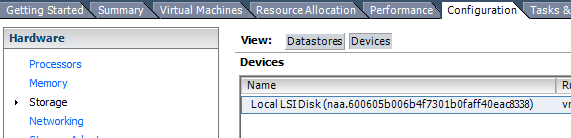
Where is ESX installed?

Under vCenter go to the Host > Configuration > Storage > Devices

1

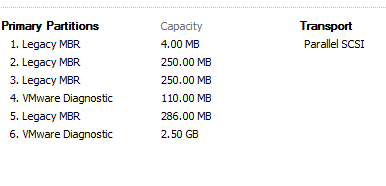
Then look for a datastore that has a few partitions such as Legacy MBR and VMware Diagnostic.  That should be where you ESX is booting from.

2


Finding the vSphere NAA from VML

I was looking for a way to corelate an disk NAA with the VMware VML. This script will give you all the information that is needed.  VMware Communities


$esxName = “myEsx”

$esx = Get-VMHost $esxName

$esx.ExtensionData.Config.StorageDevice.ScsiLun |

Select @{N=”ESX”;E={$esx.Name}},

CanonicalName,

@{N=”VML”;E={$_.Descriptor | where {$_.Id -match “^vml”} | Select -ExpandProperty Id}}

VMAX3 Deleting volume stuck in RDF mode.

I recently had some volumes set in a storage group also set in RDF.   They were in the RDF1-TDEV mode. I removed them from the storage group without first breaking the RDF.  I then found out the hard way that it was impossible to delete that volume until the RDF was broken.  I need the volume in the TDEV mode so it can be deleted.  To do this I had to go into command line and use solutions enabler.

First I had to find the volume I wanted to delete and the RDF group it was in.

symrdf -sid 123 list -rdfg -all

That gave me a list of volumes and what volumes it was being synced up to.

I then created a text file with the two volumes in it.

00010 00020

To break this pair I ran this command

symrdf -f text.txt suspend -sid 123 -rdfg # -cons_exempt

Then I can finally delete the pair.

symrdf -f text.txt deletepair -sid 123 -rdfg #

Now that is done I can finally delete the volume.

A lot of work just to remove 1 volume.

Clearing Microsoft Cluster Persistent Reservations

Recently I had the active node on a Microsoft cluster go down hard.  There were 3 applications running in this cluster and 2 came up.  The third would not come up so with a little Googling I found this article from SQLShip.

Microsoft clusters put a reservation on the disk to prevent other nodes from being able to write to them. If that reservation is not cleared and is brought offline then no one will be able to use it.

Go to command prompt with elevated privileges and type in this command.  Replace the # with the disk number that is giving you issues.  This should clear the reservation and allow you to bring everything up.

cluster node servername /clearpr:#


Setting up vCenter Update Manager

Recently I was trying to setup vCenter Update Manager for vSphere 6.  I setup the ODBC connection for 32-bit using the ODBC Driver 11 for SQL server.  Setting up this connection was successful, but when I tried to run updates in my vCenter environment I would get an error stating that it could not connect to the database.  This was an odd error because I knew the ODBC connection was successful.  I contacted support and all they told me to do was build up a new update server.  I tried that and it did not work.  So after some deep googling I found a website which stated that you had to setup the update manager service to have a log on as.  (Sorry this was done a few weeks ago, and I do not know what website it was)

So when setting up update manager make sure you configure the server to log on as a certain account.  I did not notice that in any of the documentation.  Maybe I some how missed it.

Delete a SRDF pair on VMAX3

Recently I have had some issues with SRDF on the VMAX3 that I manage.  I was having issues trying to resolve it using the Unisphere GUI, which can be very limited in its capabilities, so I had to switch to command line.  First you create a text file and put in it something like “00001 00002” (No quotation marks in file).  Listing the two devices that need there pair broken.  Then you run this command.

symrdf -sid 123 -rdfg 1 -file rdf.txt deletepair -force


vBrownBag and preperation for the VCIX

Currently I am working towards the VMware VCIX6-DCV certification.  To prepare for this I am going through the vBrownBag videos on the VCP6-DCV certification.  It is a good deep dive that covers a lot of things you may have missed or forgotten over time.  It has helped me improve things in day job that I was not doing properly.   If you are working towards an VMWare certification or just trying to learn more. I really recommended going through the videos that they have put together.  They have also covered teh VCP6-NV and VCP6-CMA.  Hopefully soon they will cover the VCP6-DTM.

Using PowerCLI to change the Syslog server for your ESX host.

I recently discovered SexiLog to use with VMware ESX host.  I needed a quick and easy way to change where the ESX host sent there logs to.  Doing some google searches I was able to put together a quick PowerCLI script.  In about 5 minutes I was able to change the syslog for all of my ESX host.

$ESXLOG = “1.2.3.4”
Get-VMHost | Foreach {
Write-Host “Adding $ESXLOG as Syslog server for $($_.Name)”
$SetSyslog = Set-VMHostSysLogServer -SysLogServer $ESXLOG -SysLogServerPort 514 -VMHost $_
Write-Host “Reloading Syslog on $($_.Name)”
$Reload = (Get-ESXCLI -VMHost $_).System.Syslog.reload()
Write-Host “Setting firewall to allow Syslog out of $($_)”
$FW = $_ | Get-VMHostFirewallException | Where {$_.Name -eq ‘syslog’} | Set-VMHostFirewallException -Enabled:$true
}

Using Solution Enabler to Delete a Storage Group

Recently I have been working on cleaning up storage on a EMC VMAX3.  You can do a lot using the GUI for most of the day to day maintenance, but using the CLI is a lot more efficient when it comes to removing storage groups.

symsg -sid 1234 delete storgegroup_SG -force

Using that command is a simpler and quicker way to remove storage groups than to use the Unisphere GUI.

Blog at WordPress.com.

Up ↑