It’s Time To Reconsider My Thoughts on GPUs in VDI…

seanpmassey's avatarThe Virtual Horizon

Last year, I wrote that it was too early to consider GPUs for general VDI use and that they  should be reserved only for VDI use cases where they are absolutely required.  There were a number of reasons for this including user density per GPU, lack of monitoring and vMotion, and economics.  That lead to a Frontline Chatter podcast discussing this topic in more depth with industry expert Thomas Poppelgaard.

When I wrote that post, I said that there would be a day when GPUs would make sense for all VDI deployments.  That day is coming soon.  There is a killer app that will greatly benefit all users (in certain cases) who have access to a GPU.

Last week, I got to spend some time out at NVIDIA’s Headquarters in Santa Clara taking part in NVIDIA GRID Days.  GRID Days was a two day event interacting with the senior management…

View original post 482 more words

VM Fails to Power On

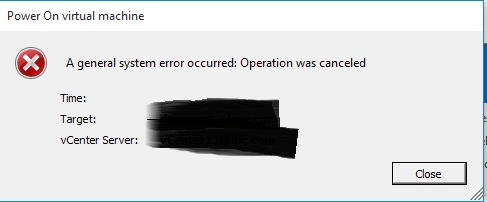
Recently I had a strange problem.  Power off VM’s would not power on, and would give this generic error.

power on error

I found KB 1006232 and was able to power on the VM by command line, but I was still not able to power them on by directly connecting to the host through the C client.  Or using vCenter through the web and C client.  I tried a lot of things, but in the end restarting the vCenter server fixed everything.

vExpert 2016

I am very happy to be able to say that I am a vExpert 2016.  I aim to be one every year.  Congratulations to all my fellow vExperts!

vExpert-2016-Badge.png

EMC and VMware introduce VxRail, a new…

EMC and VMware introduce VxRail, a new hyper-converged appliance

EMC and VMware introduce VxRail, a new…

Advertise here with BSA As most of you know I’ve been involved in Virtual SAN in some shape or form since the very first release. Reason I was very excited about Virtual SAN is because I felt it would provide anyone the ability to develop a hyper-converged offering. Many VMware partners have already done this, and with the VSAN […] ” EMC and VMware introduce VxRail, a new hyper-converged appliance ” originally appeared on Yellow-Bricks.com . Follow me on twitter – @DuncanYB.


VMware Advocacy

New Port Group not showing up under Host

I was recently built up a new Cluster of 3 host with a Distributed Switch.  I had created my Management and vMotion groups with no issues, but when I created the server port group it did not show up under hosts.  The VM’s were already built and working on the network, and  I only noticed this issue when I tried to vMotion one of the VM’s to another host.

To fix the issue I had to create a new port group for that vlan and migrate the VM’s over to it.  I then deleted the old port group, and renamed the new one to the old ones name.  I have no idea why this happened my only guess is that I hit some really weird bug.

Where is ESX installed?

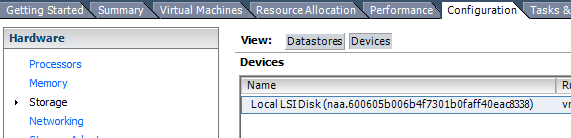
Under vCenter go to the Host > Configuration > Storage > Devices

1

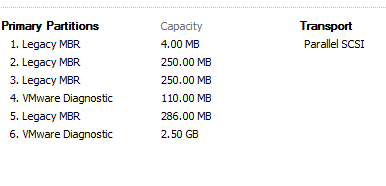
Then look for a datastore that has a few partitions such as Legacy MBR and VMware Diagnostic.  That should be where you ESX is booting from.

2


Finding the vSphere NAA from VML

I was looking for a way to corelate an disk NAA with the VMware VML. This script will give you all the information that is needed.  VMware Communities


$esxName = “myEsx”

$esx = Get-VMHost $esxName

$esx.ExtensionData.Config.StorageDevice.ScsiLun |

Select @{N=”ESX”;E={$esx.Name}},

CanonicalName,

@{N=”VML”;E={$_.Descriptor | where {$_.Id -match “^vml”} | Select -ExpandProperty Id}}

Blog at WordPress.com.

Up ↑