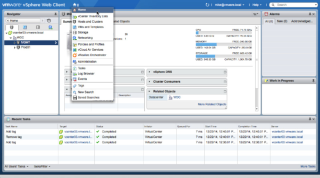
No More C Client!

The C client is dead, and going forward VMware will no longer support it.  I know there are still a lot of people using that old client, but its time to move on.  I have known that this day was coming, and have been trying to only use the web client exclusively.  Thankfully they are making a lot of changes.  Such as no more Java or flash.  Instead they are moving the web client to run on HTML5.  The new version of the web client has been available as a fling for a while now, and since ESX 6 update 2 there has been a web interface for managing the host directly.

I think this is the right decision for VMware.  Developing for both the C client and a web client; meant more resources were being used to accomplish the same thing.  I hope other companies follow VMware and only use HTML5.

Default Isolation Address

If a host thinks it is isolated by default it will ping its gateway.  It is best practice to have more than one isolation address, and you can have up to 10 of these.  Duncan Epping has a good article on it here.  Here is a simple script I found somewhere on the web.

$cluster = Get-Cluster -Name ITN

New-AdvancedSetting -Entity $cluster -Type ClusterHA -Name ‘das.isolationaddress1’ -Value 1.2.3.4

New-AdvancedSetting -Entity $cluster -Type ClusterHA -Name ‘das.usedefaultisolationaddress’ -Value false

#Disable and reenable HA

Set-Cluster -Cluster $cluster -HAEnabled:$false

Set-Cluster -Cluster $cluster -HAEnabled:$true

It’s beta time! Get your voice in and shape the…

It’s beta time! Get your voice in and shape the direction of #vSphere

It’s beta time! Get your voice in and shape the…

It’s Beta Time! The VMware vSphere team invites you to indicate your interest to join the vSphere Beta. This is a unique opportunity to get your voice in and shape the direction of vSphere. Please fill out this short survey to register your interest to join the vSphere Beta. Confirmed participants will be notified via email.


VMware Social Media Advocacy

Analyzing vSphere with Free Tools “Syslog”

Virtualization is a great technology, but sometimes it can be hard getting a closer look into your environment.  Over the next few post I am going talk about a few free tools that I use in my environment.  They have given me a lot of support in managing my environment, and I would like to think the people who made them.

Syslog can be a very useful tool.  The problem with it is that it can be very painful to use.  Luckly VMware has a great tool for that and that tool is LogInsight. It makes a great syslog server and has a lot of other features that you may find invaluable.  It is a paid product so what is a great alternative?  Sexilog is that great alternative.  With it you point all your esx host to it and watch the magic happen. Very quickly you get a better insight what is happening inside your environment. It may not have as many features as LogInsight, but nothing beats it on feature compared to price.

After update vCenter database grows excessively

When update 2 came out for vCenter 6 recently I jumped on it.  Thinking that since it was an update there should not be any issues to come from it.  Then one day I was looking at the Xtrem IO and noticed close to 1TB of bandwidth being used.    I saw that all the activity was coming from the SQL server that our vCenter used.  So I immediately got with our DBA, and  he confirmed that it was vCenter creating all that IO.  Luckly VMware support was able to quickly send me to this article.

Blog at WordPress.com.

Up ↑