VMworld 2017 Call for Papers is now open!

Inspire the VMware community, VMworld 2017 Call for Papers is now open!

VMworld 2017 Call for Papers is now open!

We’re looking for speakers who will inspire the VMware community. Have you integrated VMware solutions and technologies in an innovative way? Do you have a best practice or individual technical tips and tricks to recommend? Can you tell us about an amazing app that leverages VMware solutions to improve your business? If so, please join us at VMworld 2017.


VMware Social Media Advocacy

After SQL Installation Drives Inaccessible

Recently I setup a VM using standard best practices.  Such as using PVSCSI for the Database drives, and formatting them GPT.  Everything checked out so I passed it on to the DBA to finish up with the SQL installation.  Soon later I received an email from him saying the drives were inaccessible.  I had no idea why because I had setup a lot of VM’s the same way without any issues.  I did a quick Google search for “drive inaccessible after SQL installation”.  It turns out a lot of people have the same issue as me.  It is the result of Microsoft locking down the security for the data on the drives.  They set it up so only SQL could have access to the files to prevent certain security issues.  You can read more about it here.

Nutanix .NEXT

I was honored this year to be chosen to be a part of the Nutanix Technology Champions.  I have only recently started using Nutanix, but I could clearly see what made it different.  In an age with the Public Clould all the rage.  I could see something like Nutanix really keeping the private data center alive.  The Public Cloud is so popular because it is such an easy way to consume resources as you need them.  I see what Nutanix is doing how it is really converging everything.  Not only are storage and compute converged, but so are the underlying software.  One software package to rule them all instead of a seperate piece of software for every feature you need.

That is why I am so excited about being a part of the NTC, and the free pass I received to go to the Nutanix .NEXT conference.  Conferences can be really expensive, and I would like to thank Nutanix for investing in its community and showing its appreciation.  I know at it I will meet a lot of new people and learn a lot of new things.  Conferences are really about networking with your peers, and sharing knowledge.  For that reason I see them as valuable as any training.  Hopefully I will meet everyone who reads this post, and if you have not registered yet you can at .NEXT

Updating Prism Central to 5.0

Nutanix recently released the 5.0 code, and it has a lot of new really nice features.  In a future post I plan on going over some of the features, and detail why they are so important.

Before you start upgrading all of your Nutanix host you should first upgrade Prism Central to 5.0  This server gives you an overview of all your Nutanix clusters and some management capabilities.  I am still fairly new to Nutanix so I was not sure how to upgrade Prism Central.  Usually you can upgrade from within the Nutanix console, but with this being a brand new release you had to download it directly from the website.  Sometime soon in the future it will be a part of the automatic upgrade within the Console.

At first I was a little confused about how to upgrade.  You would think there would be a separate upgrade for Prism Central since it was originally a  separate install.  Instead the update is included in the AOS 5 download.  Download the complete AOS 5.0 and also download the Upgrade Metadate File.
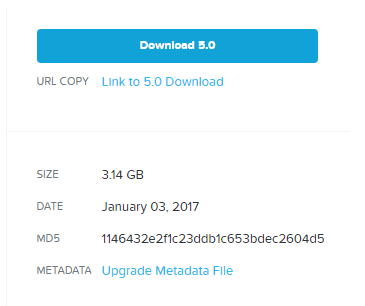
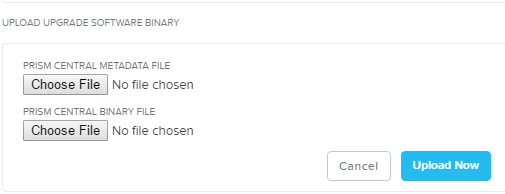
2017-01-17-08_43_02-nutanix-portalOnce you have that downloaded everything login to Prism Central. Next click the gear icon and then click upload the Prism Central Binary.  Now point  it to the AOS 5.0 download and the metadate file.  Click upgrade and soon you will be running Prism Central 5.0.  2017-01-17-08_46_42-nutanix-web-console
VMAX3 and Locked Devices

I have an application that writes to its Device then  inside the array that Device is mirrored to an BCV.  When it is time for a backup a script will kick off that will break the mirror.
Then the backup application reads the data from that mirrored BCV.  Sometimes things will go wrong and that script will never resync the mirror.  That then results in broken backups.  To fix this I had to go into the VMAX3 SYMCLI and run these few commands.

  1.  symdev -lock list
  2. symdev release “Then confirm yes for each lock”

Looks really simple doesn’t it?  It took me a while to figure out.  It is not often I have to touch the VMAX and when I do it is usually with the GUI.  I also have a thick book of all the long complicated SYMCLI commands.  Thankfully through trial and error it ended up just being two simple commands.

vCenter Server Resource Missing or Invalid

Recently I was trying to deploy an OVA file.  After selecting the storage I recieved the following error. capture

I tried downloading the OVA again, but still had the same issue.  Luckily it was an easy fix.  I was trying to deploy the OVA at the Cluster level.  What I needed to do was deploy the OVA at the ESXi level in vCenter.  Hopefully in a future vSphere update this will no longer be an issue.

VMware Quick Tip: Installing a VIB

Usually you use VMware Update Manager to install VIB’s such as Dell’s Open Manage.  You can also SSH into a host and use ESXCLI.

First upload the Offline .Zip file to your datastore.  Then you will need to find the mount point.

esxcli storage filesysem list

Now that you install the VIB.

esxcli software vib install -d “/vmfs/volumes/Datastore/DirectoryName/PatchName.zip

Now verify

esxcli software vib list


Whitepaper with Liquidware Lab and Roundtower

I have recently been working on a project to implement Liquidware Labs ino an exsisting  End User Computing environment.  The desktops are non-persistent and roaming.  This allows for a user to login to a thin client in one room, then move to another room bringing that desktop along with them when they login.  The system was already setup using VMWare Horizon View 6.2 and Microsoft Windows 7 for the desktops.  For hardware it was using Cisco UCS for the compute and EMC XtremIO for storage.  All inside an VCE Converged vBlock.   Everything was online and running, but it still had a few requirements that were not being met.  Such as printer mapping and profile roaming.  We were not sure exactly which direction to go, but  I was lucky enough to work with Eduardo Molina and Roundtower who directed us to use Liquidware Labs.  They helped us a lot with the implementation and training to get everything up and running.  I was lucky enough to be part of a whitepaper, and you can read more about it in this here.


Blog at WordPress.com.

Up ↑